Share on X to Unlock Your Claim (Step-by-Step Tutorial)
There's no X login on the app — just a public share
The new step has confused some long-time players, so let's be clear up front:
- You don't sign in with X. Your existing account (Google sign-in, Apple sign-in, email, or guest) still works exactly as before.
- You don't connect X to your account. The wallet doesn't read your X profile or store your X handle.
- The only X-related step is posting once. The wallet generates a pre-written post for you. You post it on X, copy the post's URL, and paste the URL back. That's the whole "X" interaction.
If you previously played without an X account, the only change is that at claim time the wallet asks you to do a one-time public share. Once verified, you can claim normally for the next 14 days.
The 4 steps
Step 1 — Tap "Open X to post"
In your wallet you'll see a card that says 🔒 Claims locked — share on X to unlock. Tap the Open X to post button.
The X app opens with a post already written for you — it includes your referral code and a link to the game. You don't need to type anything.
Step 2 — Post it on X
Tap Post in X. Wait around half a minute so X has time to publish — if you come back too fast, the wallet can't find the post yet.
Step 3 — Copy the post's link
In X, open the post you just made. Tap the Share icon at the bottom of the post, then tap Copy link.
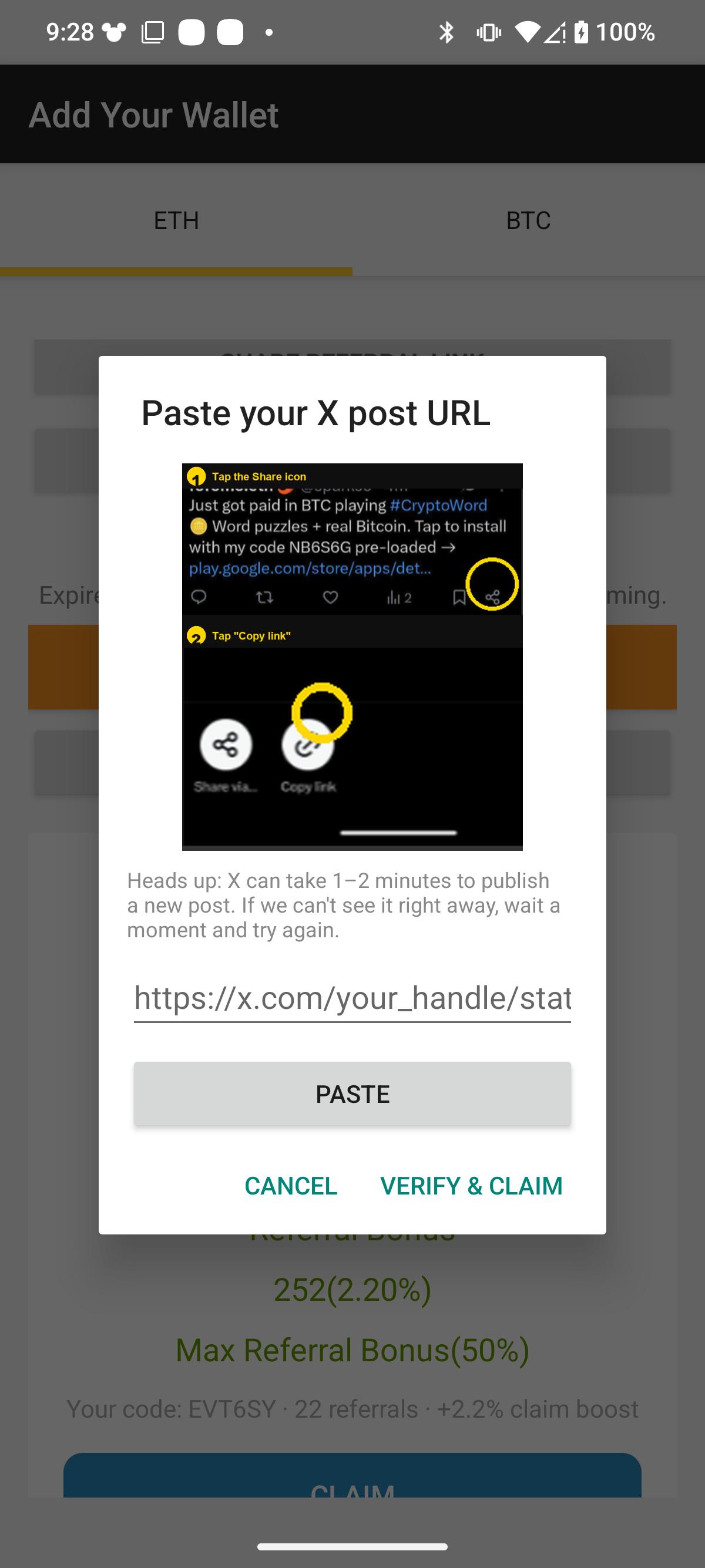
Step 4 — Go back to the app and paste
Tap I already posted (paste URL). Tap the Paste button — the link is already on your clipboard, so it fills in automatically. Then tap Verify post.
Why we added this step
Two honest reasons:
- It blocks farms. Automated account farms can mass-produce app installs but they struggle to produce real X accounts that post in public and survive moderation. Adding a one-time public-share verification keeps the payout pool flowing to real players instead of getting drained by bot accounts. Every Gwei or SAT not paid to a farm is a Gwei or SAT that can be paid to you.
- It brings in new players, so we can keep paying. Each share posts a referral link. Some of those clicks turn into new installs. That's how the game stays free of pop-up ad walls between every level — instead of ads, your share is the marketing.
It's a fair trade we think most players will accept: one 30-second public share unlocks unlimited claims for 14 days.
Common error messages and what to do
| Message | What it means · how to fix |
|---|---|
| "We can't see your post yet" | X is slow to publish (especially on weak mobile signal). Wait a minute and tap Verify post again — same URL, no need to re-post. |
| "Your post needs to include your referral code" | You edited the pre-written post and removed the link. Tap Open X to post again to get a fresh post with the code already filled in. |
| "This post is too old" | Only shares from the last couple of weeks count. Post a fresh one. |
| "This X account has already been used" | Each X account can verify one game account only. Use a different X account for a different game account. |
| "Your X account is private" | The verifier needs to read the post publicly. Either make the post public for a moment, or use a public X account. |
"My Gwei / SATS balance is gone after updating"
It hasn't actually gone — your earned balance lives on our servers, tied to your account, not to your phone. Some players have written in after the 1.8.7 update saying their balance vanished. In every case so far it's been one of these three:
- Wrong sign-in. If you previously signed in with Google, Apple, X, or email, you have to sign in the same way again in the new version. Signing in fresh as a guest creates a brand-new empty account. Tap the profile / settings icon and pick your original sign-in method.
- App reinstall as guest. If you uninstalled and reinstalled without first signing in, the app starts fresh. Sign in with your original method to pull your real balance back.
- Different device. Signing in on a new phone needs the same original sign-in method as the old phone.
If none of that brings your balance back, email support@vweeter.com with your registered email + your last known balance and we'll pull it from server logs. The balance is in the database; we just need to match you to it.
CryptoPop — Free Ethereum Puzzle
Free coin-linking puzzle from Vweeter. Pays real ETH on Optimism via Web3 wallet, FaucetPay, or Binance Gift Card. Over 1 million downloads — still paying out in 2026.
FAQ
Do I need an X (Twitter) account to use Vweeter apps?
No. You don't need an X account to play or earn — the apps have no X login. You only need an X account when you want to claim a payout, because the claim flow uses a one-time public share on X as a verification step (similar to how some games ask you to retweet to enter a giveaway). If you don't have an X account, signing up is free and takes about a minute.
Why did Vweeter add the Share-on-X step?
Two reasons. First, public-share verification is a strong anti-farming signal — automated farms struggle to produce real X accounts that post and survive moderation, which protects the payout pool for real players. Second, every share posts a referral link, which brings new players in and lets us keep running the game without ad walls between every level. It's a fair trade: one 30-second public share unlocks 14 days of unlimited claims.
It says "We can't see your post yet" — what now?
X is sometimes slow to publish, especially on shaky mobile connections. Wait about a minute and tap Verify post again with the same URL. Don't post a second time — the original post will appear and verify as soon as X's API catches up. If it's still failing after 5 minutes, check that your post is public (not protected/private) and try again.
It says my post needs to include my referral code.
Your code is missing from the post text. This usually happens if you edited the pre-written post and removed the link or the code before posting. Easiest fix: tap Open X to post again — the wallet generates a fresh post with the code already filled in. Post it, copy the new URL, paste it back.
It says my post is too old.
Verification only accepts shares posted in the last couple of weeks. If you're trying to reuse an old post, the wallet will reject it. Tap Open X to post to get a fresh post, share it, and paste the new URL.
It says my X account has already been used.
Each X account can only unlock claims for one game account. This prevents one X account from being used as a verification shortcut for a farm of game accounts. If you legitimately have a second Vweeter app account (e.g. a friend or family member who shares your phone), you'll need a different X account to verify it from.
How long does the unlock last?
14 days. After verifying, you can make unlimited claims for 14 days. When the 14 days are up, the wallet will show the lock icon again and you'll need to share once more to get another 14-day window. There's no daily limit or per-claim share — just one share every 2 weeks.
Do I have to keep the post up?
Yes, please leave the post up for at least the 14-day unlock window. If you delete the post, our verifier will detect it on the next claim and the unlock ends — you'd need to share a fresh one before the next claim. Easiest is to just leave it; it's a short, harmless post.
My old Gwei / SATS balance disappeared after updating the app.
It hasn't. Your earned balance is tied to your account, not your device, and the new version simply has a different home screen layout. If you previously signed in with a social login (Google, Apple, or X), tap that same sign-in option in the new app and your balance reappears. If you were playing as a guest, tap the profile icon and look for Restore account using the same device. If neither works, email support@vweeter.com with your registered email and previous balance — we have server-side logs.